VCF Fleet Management UI will not allow to select import certificate
Article ID: 432630
Updated On:
Products
VCF Operations
Issue/Introduction
The VCF Fleet Management UI does not allow the selection of the Import Certificate option and all the fields related to validity and certificate information is blank. Certificate health is marked red stating it is unhealthy.
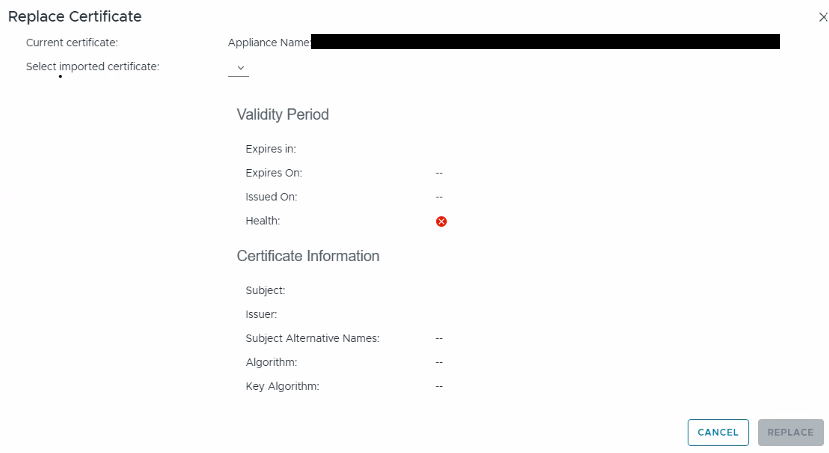
Fleet Management logs will show below errors:
/var/log/vrlcm/vmware_vrlcm.log:INFO vcfops-bridge [ops@### threadId="###" threadName="ServerConnection on port 10000 Thread 18"] [com.vmware.vcops.bridge.server.vcf.certificate.task.VRSLCMRestManager.fetchCertificates] - get certificates from vrslcm for commonName -
INFO vcfops-bridge [ops@### threadId="###" threadName="ServerConnection on port 10000 Thread 18"] [com.vmware.vcops.bridge.server.vcf.certificate.task.VRSLCMRestManager.fetchCertificates] - get certificates from vrslcm for cursor
ERROR vcfops-bridge ### [ops@xxxx threadId="###" threadName="ServerConnection on port 10000 Thread 18"] [com.vmware.vcops.bridge.server.vcf.certificate.task.VRSLCMRestManager.fetchCertificates] - Exception occurred in fetching cert listERROR vcfops-bridge ### [ops@xxxx threadId="###" threadName="ServerConnection on port 10000 Thread 18"][com.vmware.vcops.bridge.server.vcf.certificate.task.VRSLCMRestManager.fetchCertificates] - Exception occurred in fetching cert list, error=
java.lang.NullPointerException: Cannot invoke "String.toLowerCase()" because "cName" is null
atcom.vmware.vcops.bridge.server.vcf.certificate.task.VRSLCMRestManager.mapVrslcmImportCertListResponseToApiResponse(VRSLCMRestManager.java)
at com.vmware.vcops.bridge.server.vcf.certificate.task.VRSLCMRestManager.fetchCertificates(VRSLCMRestManager.java:###) ~[?:?]
at com.vmware.vcops.bridge.server.vcf.certificate.task.VRSLCMRestManager.fetchRecommendedCertificates(VRSLCMRestManager.java:###) ~[?:?]
at com.vmware.vcops.bridge.server.DataRetrieverServer.fetchRecommendedCertificates(DataRetrieverServer.java:###) ~[?:?]Environment
VCF Operations 9.0.x
VCF Fleet Management 9.0.x
VCF Fleet Management 9.0.x
Cause
As per the Fleet Manager, before it allows you to apply a certificate to a VCF Operations cluster, it reads the certificate’s metadata and compares it against the VCF Operations node information stored in its database. If the CN is missing, or if the Subject Alternative Names (SANs) do not contain the exact IP addresses and FQDNs of your VCF Operations nodes, Fleet Management intentionally hides the certificate from the dropdown.
Resolution
- Please review the CSR request and its details to ensure that the correct FQDN and IP information are included and it should be resolvable at the domain level. Additionally, verify that the CN (Common Name) matches the correct product name for which the certificate replacement is being performed.
- After providing the correct CN name, the certificate replacement was processed successfully using the Fleet Manager UI, and the option to import the certificate became available.
Additional Information
Feedback
Yes
No
Powered by
