Azure VMware Solution (AVS) adapter configuration in Aria Operations fails with {"error":null}
Article ID: 430278
Updated On:
Products
VCF Operations/Automation (formerly VMware Aria Suite)
Issue/Introduction
When attempting to configure or validate the Azure VMware Solution (AVS) Private Cloud Adapter in VMware Aria Operations, the configuration fails with the following error:
/storage/log/vcops/log/AVS_adapter.log reveals the following un-parsed error and AuthenticationException:
YYYY-MM-DDTHH:MM:SS,873+0000 ERROR [TasksManager-TaskHandler-31] (xxx) com.vmware.vrops.adapter.avs.util.AVSAdapterClient.<init> - [AvsAdapterClient] Error Occured :
java.lang.RuntimeException: java.io.IOException: com.microsoft.aad.adal4j.AuthenticationException: {"error":null}
...
YYYY-MM-DDTHH:MM:SS,874+0000 ERROR [TasksManager-TaskHandler-31] (xxx) com.vmware.vrops.adapter.avs.util.AVSAdapterClient.<init> - UN-PARSED ERROR : {"error":null}
YYYY-MM-DDTHH:MM:SS,875+0000 ERROR [TasksManager-TaskHandler-31] (xxx) com.vmware.vrops.adapter.avs.AVSAdapter.onConfigure - Configure failed with exception
com.vmware.vrops.adapter.avs.exception.LoginException: {"error":null}
Environment
VMware Aria Operations 8.18.x
Cause
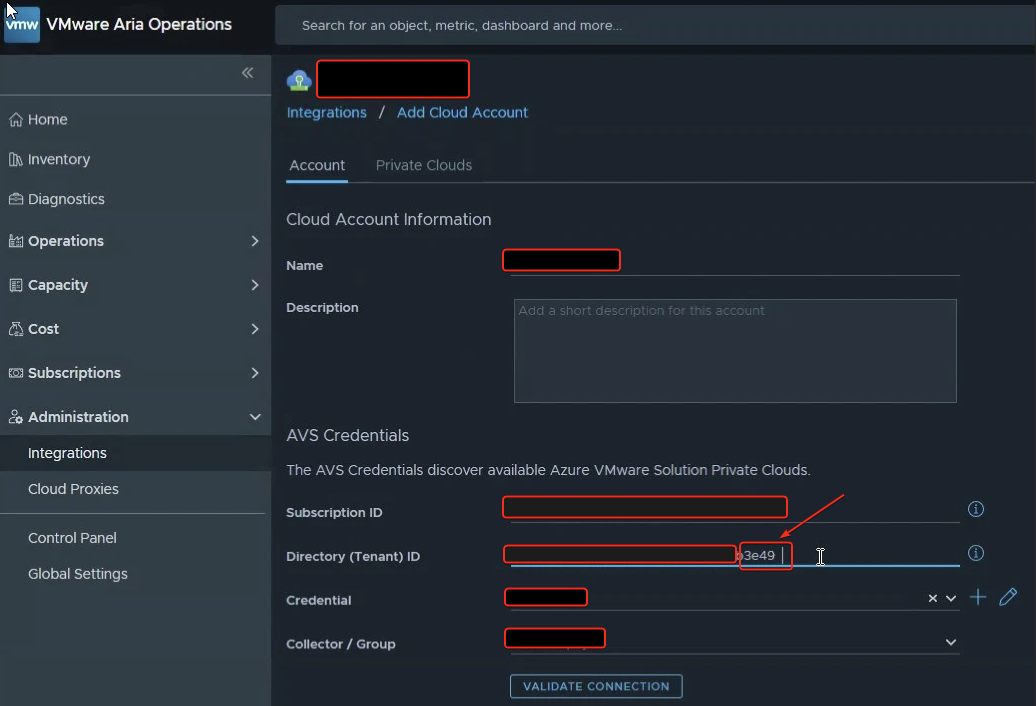
This issue is caused by a hidden trailing whitespace at the end of the Tenant ID (or other credential strings like the Subscription ID) entered in the Aria Operations UI while configuring the AVS adapter.
Resolution
Verify using APIs if the required parameters are correct and authenticatication succeeds:
-
SSH to primary node of Aria Operations as
root -
Run the following
curlcommand to ensure authentication is successful and token is retrieved:curl -X POST https://login.microsoftonline.com/<TENANT_ID>/oauth2/token \ -H "Content-Type: application/x-www-form-urlencoded" \ -d "grant_type=client_credentials" \ -d "client_id=<CLIENT_ID>" \ -d "client_secret=<CLIENT_SECRET>" \ -d "resource=https://management.azure.com/"Note:
<TENANT_ID>,<CLIENT_ID>and<CLIENT_SECRET>values to be collected from Microsoft Azure Portal.
To resolve this issue, you must remove any hidden trailing spaces from the configuration fields in the Aria Operations UI:
-
Log in to the Aria Operations UI as
adminuser -
In the left panel, Navigate to
Data Sources > Integrations > Accounts. -
Edit the failing Azure VMware Solution adapter instance.
-
Click into the Tenant ID or Subscription ID field, place your cursor at the very end of the text, and press the Backspace key to ensure there are no trailing spaces.
-
Click
Validate Connection. The validation should now succeed. -
Click
Saveto apply the configuration and begin data collection.
Feedback
Yes
No
Powered by
