VCF deployment failed with creating disk groups task failure
Article ID: 414591
Updated On:
Products
VMware vSAN
Issue/Introduction
Symptom:
- Create disk group task fails during VCF deployment.
Validation:
- Login to the vCenter and select the vSAN cluster, to find issues reported under skyline health.
Environment
VMware vSphere vSAN
Cause
- If all hosts in the vSAN cluster are not using this vCenter Server as the source of truth for vSAN cluster configuration, this will cause a network partition on the vSAN cluster, which will lead to other issues such as inaccessible objects.
- In the "/var/log/vmware/vcf/domainmanager/domainmanager.log", of VCF installer, you will see below entries -
YYYY-MM-DDTHH:MM:SS.###+0000 DEBUG [vcf_dm,####################,####] [c.v.e.s.c.c.v.vsan.VsanManagerBase,dm-exec-9] VSAN Cluster Status: VsanClusterStatusInfo(numberOfDataDisksInUse=4, numberOfDataDisksEligible=4, numberOfSsdDisksInUse=4, numberOfSsdDisksEligible=4, numberOfHostsInUse=4, lowestNumberOfHostsInClusterNode=1, numberOfHostsInClusterNode=4, pendingObject=esxi01.localhost:PARTITIONED, healthVersionInconsistent=true, resourcesAvailable=false)
Resolution
- To fix this problem, login to vCenter > Cluster > Monitor > vSAN > Health. Select Cluster > vCenter state is authoritative, and click depending on installed Builds:
"Update ESXi configuration" or "Remediate Inconsistent Configuration".
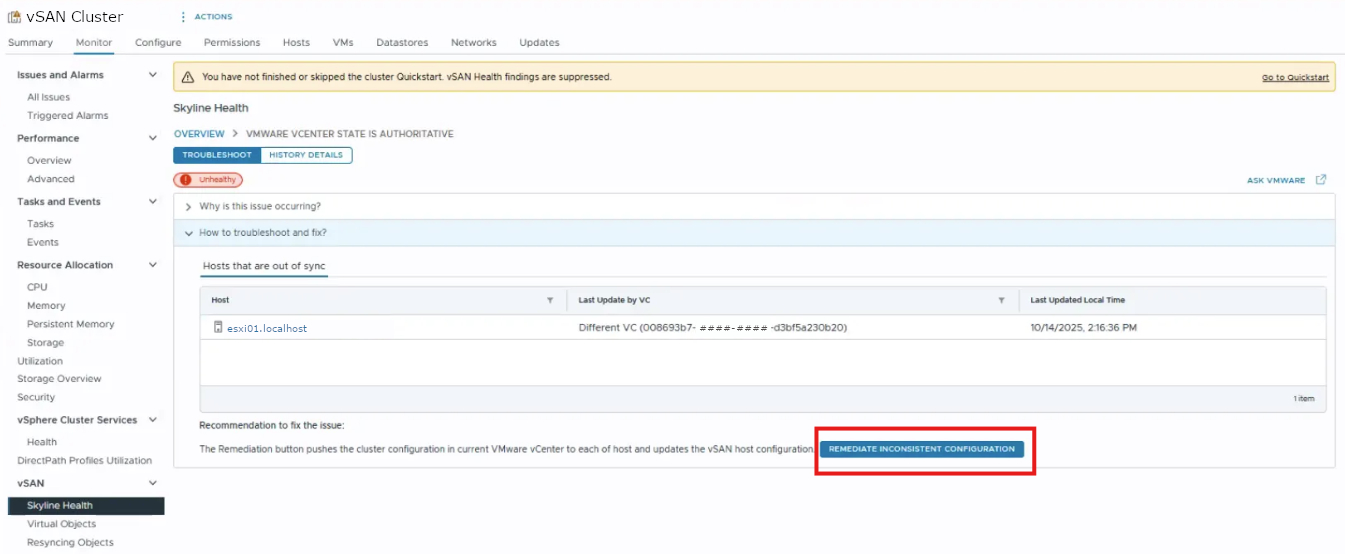
Note: This action synchronizes all hosts in the cluster with the current vCenter Server, and forces the vCenter Server configuration, including the vSAN cluster membership list, to all member hosts.
Additional Information
Feedback
Yes
No
Powered by
