VCFA Patching to Version 9.0.1.0 Fails Due to Invalid Patch File URL Format with Error LCMVMSP10036
Article ID: 412924
Updated On:
Products
VCF Automation
Issue/Introduction
VCFA patching to version 9.0.1.0 fails due to invalid patch file URL format
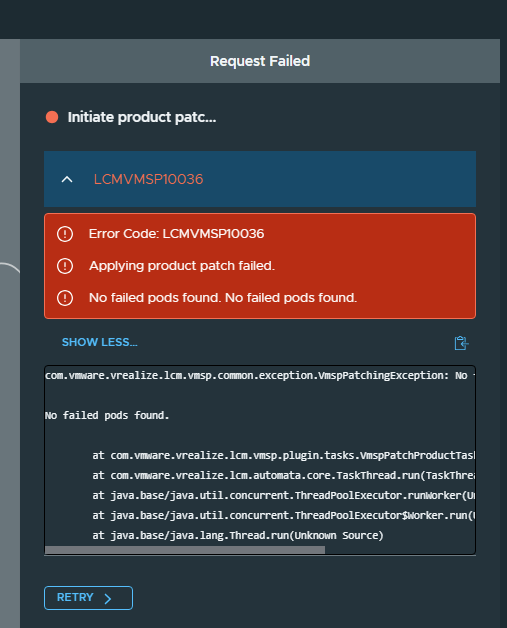
Environment
VCF 9.0.0.0
Cause
VCFA patching to version 9.0.1 fails due to improperly formatted patch file URLs in the patching request.
Log entries indicate that the patch file URLs (
productPatchFileName and vmspPatchFileName) reference the Fleet Management server using a non-fully qualified domain name (non-FQDN) format. The system requires the use of a fully qualified domain name (FQDN) to resolve the URLs correctly.Example log excerpt:
"productPatchFileName": "https://<shortname for fleet management>/repo/productPatchRepo/patches/vra/9.0.1.0/vcfa-bundle-9.0.1.0.24965341.tar",
"productId": "vra",
"fqdn": "##.##.###",
"primaryVip": "##.##.##.##",
"rollbackPatch": "false",
"vmspPatchFileName": "https://<shortname for fleet management>/repo/productPatchRepo/patches/vra/9.0.1.0/vmsp.tar",
"version": "9.0.0.0"
Resolution
Update the patch file URLs to use the FQDN of the Fleet Management server instead of the short name.
Steps:
-
Identify the incorrect patch file URLs referencing the short name
-
Replace the short name with the correct FQDN of the Fleet Management and retry the patching process.
Feedback
Yes
No
Powered by
