Cluster Imbalance Detected: Discrepancies in /storage/db, Objects in Process, and Metrics in Process on the nodes
Article ID: 402841
Updated On:
Products
VCF Operations/Automation (formerly VMware Aria Suite)
Issue/Introduction
In VMware Aria Operations, administrators may observe that:
- The cluster fails to auto-rebalance.
- Cluster is OFFLINE and the nodes are in WAITING FOR ANALYTICS.
- Cluster is OFFLINE and the nodes are in WAITING FOR ANALYTICS.
Above results in inconsistent performance across nodes. Common symptoms include significant differences in:
- Disk usage on /storage/db
- Objects in Process
- Metrics in Process
- Disk usage on /storage/db
- Objects in Process
- Metrics in Process
Error in the
/storage/log/vcops/log/fsdb-accessor-<uuid>.log file:####-##-#####:##:##, ###+#### ERROR [#####-######-####-####-#########-#######] com.integrien.alive.FSDB.FSDBAccessor.onFsdbException - FSDB throws an exception: CorruptedFileException: The file /usr/lib/vmware-vcops/data/01/01234/12345678_10_01234.dat was corrupted loadHeader: Header version mismatch 0 != 2 and failed to repair No any data could be repaired, the file '/usr/lib/vmware-vcops/data/01/01234/12345678_10_01234.dat' was deleted.Environment
Aria Operations 8.x
Cause
Cluster imbalance and rebalance failure may occur due to corrupted FSDB files. These files are critical to Aria Operations ability to manage and distribute workloads across nodes. When they are corrupted, commonly due to Invalid or future timestamps, they disrupt FSDB's ability to function correctly and prevent the cluster from rebalancing workloads evenly.
Resolution
Please take snapshots for all nodes in Aria Operations cluster after taking the cluster offline before making changes on any Aria Operations nodes.
Step 1: Validate Cluster Imbalance
Perform the following checks to identify imbalance and potential FSDB corruption:
Perform the following checks to identify imbalance and potential FSDB corruption:
A: Check Metrics
- Log in to the Primary Node Admin UI as
- Navigate to the cluster metrics dashboard.
- Check Objects in Process and Metrics in Process on all nodes.
- Log in to the Primary Node Admin UI as
admin.- Navigate to the cluster metrics dashboard.
- Check Objects in Process and Metrics in Process on all nodes.
B: Check Disk Usage
- SSH into each node as
- Run:
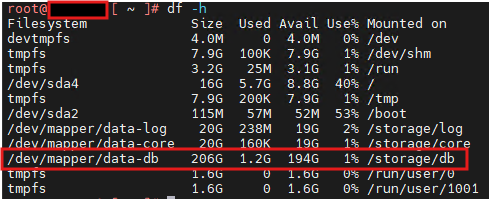
- SSH into each node as
root.- Run:
df -h- Validate that the
/storage/db partition size is consistent across nodes.Step 2: Detect Corrupted FSDB Files
- SSH into each node as
- Run:
- SSH into each node as
root.- Run:
find /storage/db/vcops/data/ -type f -not -regex '.*/[2][0][2][0-9]_[0-9][0-9]_.*.dat' -and ! -regex '.*/[2][0][1][7-9]_[0-9][0-9]_.*.dat' -and ! -name '*dtr' -and ! -name 'mps_*'- A corrupted FSDB file might look like:
An example of a corrupted file is as follows:
/usr/lib/vmware-vcops/data/01/01234/12345678_10_01234.dat.
Note the future timestamp at the end of the file in bold.
/usr/lib/vmware-vcops/data/01/01234/12345678_10_01234.dat.
Note the future timestamp at the end of the file in bold.
An example of a valid file is as follows:
/usr/lib/vmware-vcops/data/01/01234/2025_10_01234.dat.
Note the relatable timestamp in bold.
Step 3: Remediate Corruption and Rebalance
If corrupted files are found:
- Log in to the Primary Node Admin UI.
- Take the Cluster OFFLINE via Admin UI.
- Power off all Analytics VMs from the vSphere Client.
- Take a SNAPSHOT of all nodes for backup.
- Power on all Analytics VMs from the vSphere Client.
- Manually delete the identified corrupted
Refer: Corrupted FSDB files due to unrealistic timestamp - Aria Operations
- Bring the Cluster ONLINE from Admin UI.
- Allow some time for the system to auto-rebalance.
If corrupted files are found:
- Log in to the Primary Node Admin UI.
- Take the Cluster OFFLINE via Admin UI.
- Power off all Analytics VMs from the vSphere Client.
- Take a SNAPSHOT of all nodes for backup.
- Power on all Analytics VMs from the vSphere Client.
- Manually delete the identified corrupted
.dat and related .cache files from affected nodes.Refer: Corrupted FSDB files due to unrealistic timestamp - Aria Operations
- Bring the Cluster ONLINE from Admin UI.
- Allow some time for the system to auto-rebalance.
Step 4: Manual Rebalancing (if auto-rebalance does not work)
If cluster balance is not restored automatically
- Log in to the Primary Node Product UI as
- Navigate to:
- Expand
If cluster balance is not restored automatically
- Log in to the Primary Node Product UI as
admin.- Navigate to:
Administration > Control Panel > Cluster Management- Expand
Actions and click Rebalance.- Ensure to select the Rebalance Disk Option.
- Wait up to 24 hours for the rebalancing process to complete.
- Re-validate that following are now consistent across all nodes.:
-
- Objects in Process
- Metrics in Process
- Re-validate that following are now consistent across all nodes.:
-
/storage/db usage- Objects in Process
- Metrics in Process
Feedback
Yes
No
Powered by
