Number of servers displayed in the cost drivers page does not match the count shown when the group is expanded
Article ID: 401341
Updated On:
Products
VCF Operations/Automation (formerly VMware Aria Suite)
Issue/Introduction
In VMware Aria Operations, users may notice a discrepancy between the number of servers displayed on the Cost Drivers page and the count shown when a specific group is expanded.
Environment
Aria Operations 8.18.x
Cause
In the Postgres database, the
server_details column retains deleted or outdated entries, which results in a mismatch between the number of servers shown on the Cost Drivers page and those displayed when the group is expanded.Resolution
Follow the steps mentioned below to solve the issue:
- Take snapshots of all the nodes part of Aria Operations cluster.
- SSH into the Aria Operations primary node with
- Launch the psql utility and connect to the vPostgres database by running this command:
- SSH into the Aria Operations primary node with
root credentials.- Launch the psql utility and connect to the vPostgres database by running this command:
su - postgres -c "/opt/vmware/vpostgres/current/bin/psql -d vcopsdb -p 5433"- Execute the following command to truncate the serverhardwaregroup table:
truncate serverhardwaregroup;- Login as
- Expand the Left Panel, Click on Control Panel > Cost Calculation

- Manually run the Cost Calculation
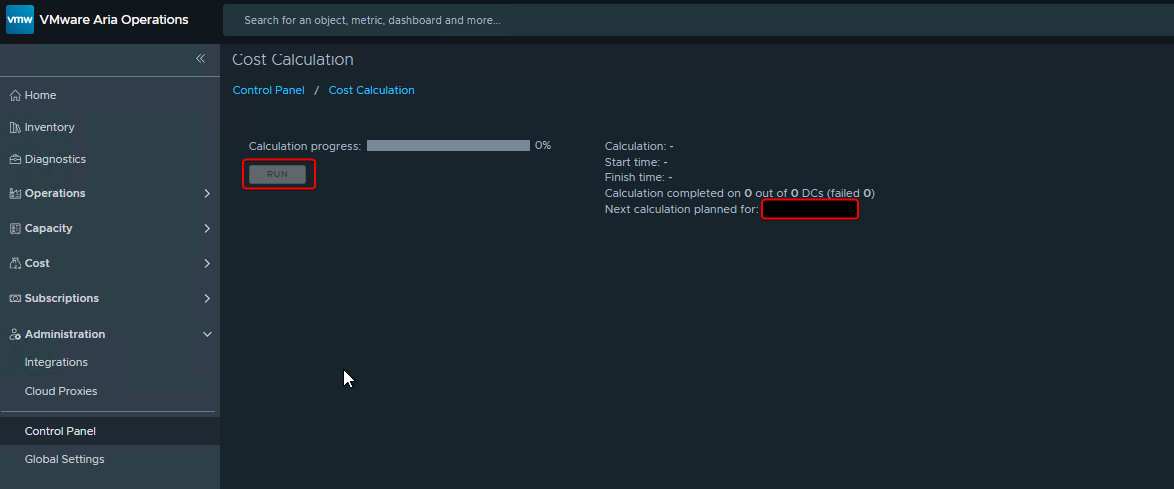
- Wait for Calculation to complete
- After completing the above steps, the mismatch in server count on the Cost Drivers page should be resolved.
admin in the https://<Aria_Ops_FQDN>/ui- Expand the Left Panel, Click on Control Panel > Cost Calculation
- Manually run the Cost Calculation
- Wait for Calculation to complete
- After completing the above steps, the mismatch in server count on the Cost Drivers page should be resolved.
Additional Information
Notes:
- This issue does not impact any cost calculations. However, it may cause confusion due to the inaccurate information displayed in the user interface.
- The Cost Schema can only be accessed on port 5433.
- This issue does not impact any cost calculations. However, it may cause confusion due to the inaccurate information displayed in the user interface.
- The Cost Schema can only be accessed on port 5433.
Feedback
Yes
No
Powered by
