Managing imfile-state:XXXX log rotation duration
Article ID: 401091
Updated On:
Products
Issue/Introduction
The imfile-state:XXXX keeps a track of the messages that have been processed by the rsyslog daemon, and they are not removed automatically.
Environment
vCenter server 7.x
Cause
The imifile-state:XXXX log build-up would eventually lead to /storage/log partition becoming full.
Resolution
We can manage log rotation duration of the EAM service by limiting it to a specific number of days for example 30 days.
Take an offline snapshot of your vCenter Server making any changes.
On the vCenter Server shell, run the following commands:
1. Back up the file:
/usr/lib/vmware-eam/web/conf/server.xml
# cp /usr/lib/vmware-eam/web/conf/server.xml /usr/lib/vmware-eam/web/conf/server.xml.bak
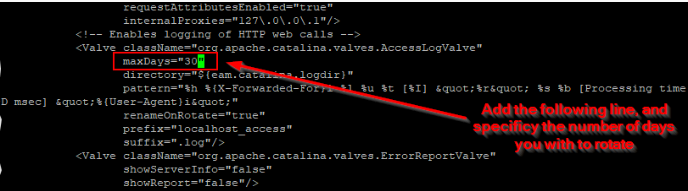
2. Using the text editor vi, modify the server.xml file that was backed up in the first step. Locate the line:
<Valve className="org.apache.catalina.valves.AccessLogValve"3.Add the following parameter:
maxDays="<numberOfDays>"Save the changes, and restart the ESXi Agent Manager service.
See the example screenshot below:
4. Restart the EAM
# service-control --restart vmware-eamAdditional Information
If you would to prefer to clear imfile-state:XXXX file log build up on hourly basis you can run cron job refer to the KB : 318149
Feedback
