Aria Operations NVIDIA dashboards does not show complete data
Article ID: 345972
Updated On:
Products
VCF Operations/Automation (formerly VMware Aria Suite)
Issue/Introduction
The purpose of this article is to inform the user of the issue and provide a workaround.
Symptoms:
Symptoms:
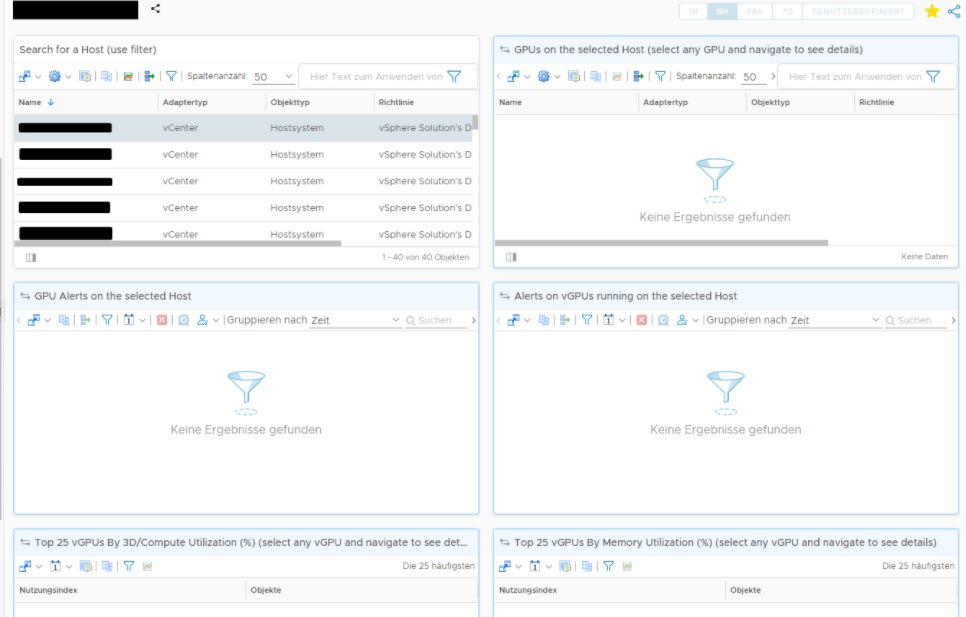
- After installing the NVIDIA Virtual GPU Management Pack for Aria Operations, the NVIDIA Host Summary dashboard does not show the vGPU/GPU-related details.
- The dashboard only shows the host details.
- Here is a sample screenshot representing the issue:
- From the vROPS Adapter logs, it is observed that when the Nvidia Adapter is trying to fetch the data on the host, it is failing with the below error: /storage/log/vcops/log/Adapters/NVIDIA.xxx
com.nvidia.nvvgpu.adapter.NvVGPUAdapter.retryCollection - Error collecting data for host: xxxxxxxxxxxx
com.nvidia.nvvgpu.adapter.exception.NvVGPUAdapterException: Received invalid response from CIM Provider. Error code: -6
com.nvidia.nvvgpu.adapter.exception.NvVGPUAdapterException: Received invalid response from CIM Provider. Error code: -6
Environment
VMware Aria Operations 8.x
Cause
nv-hostengine is needed to be running on the ESXi host in order for the GPU details and metrics to be received by the vROPS adapter
Resolution
The workaround is to restart the nv-hostengine service on the affected ESXi host.
Here are the steps:
- Login to the affected ESXi host as root
- Run the below command to stop the service: nv-hostengine -t
- Run the below command to start the service: nv-hostengine -d
- ps | grep nv-hostengine (lists the running nv-hostengine processes)
Once the service is started, wait for at least 15 minutes for the GPU data to reflect in the dashboards.
Additional Information
https://enterprise-support.nvidia.com/s/article/Physical-GPU-along-with-vGPU-details-missing-from-vROPS-dashboards-due-to-nv-hostengine-not-running
Feedback
Yes
No
Powered by
