How to Configure VTEP IP of the Data Center Gateway (DCGW) When Deploying EVPN Inline Mode
Article ID: 345762
Updated On:
Products
VMware NSX
Issue/Introduction
This article provides high level details on how to configure VTEP IP on the DCGW
Symptoms:
Traffic originating from DCGW might get dropped at the Edge.
Symptoms:
Traffic originating from DCGW might get dropped at the Edge.
Environment
VMware NSX-T
Cause
This issue generally occurs when the same IP address is used for both the BGP (Border Gateway Protocol) session and the VTEP IP. The BGP session and VTEP IP should have distinct IP addresses to avoid conflicts and ensure smooth traffic flow.
Resolution
This is a information KB for to ensure smooth traffic flow from the DCGW, Misconfiguration of this IP can result in dropped traffic at the edge.
Workaround:
Case 1: The local IP address of the MP-BGP session and VTEP IP are the same.
Refer to the below topology diagram, In this case the local IP address of the BGP session and the VTEP IP is the same.
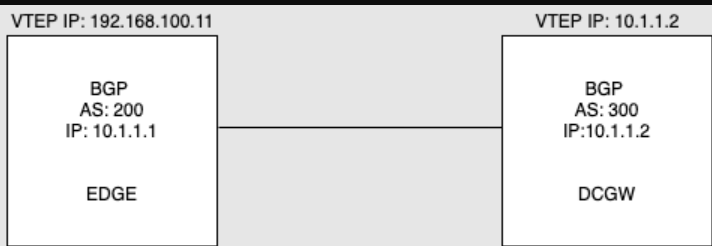
BGP session IP: 10.1.1.2
In this scenario the next-hop address in the BGP NLRI in the BGP update would be 10.1.1.2.
BGP update packet -> Path attribute->Next hop network address ->Next Hop:
10.1.1.2.
Case 2: The local IP address of the MP-BGP session and VTEP IP are different.
Please to the refer the below topology. In this case the local IP address of the BGP session and the VTEP IP are different.
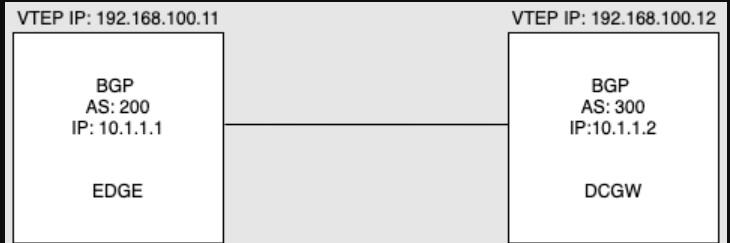
In this case the next hop IP in the BGP packet will be different from the IP
address of the packet.
In this scenario the next-hop address in the BGP NLRI in the BGP update would be 192.168.100.12.
BGP Update packet->Path attribute->Next hop network address ->Next Hop:
192.168.100.12
Note - Configuring the DCGW to this effect can vary between different vendors. Some routers have a specific command to explicitly indicate the VTEP IP, while others may require configuring the next-hop IP of the outbound BGP packets.
Workaround:
- Configure the VTEP IP as the next-hop IP under the l2vpn EVPN address family.
- This workaround fixes the problem by giving the VTEP its own unique IP address. This way, it doesn't clash with the IP address used by the BGP session.
- This workaround is applicable to versions 3.0.x (Grindcore) and 3.1.x (Highline).
Case 1: The local IP address of the MP-BGP session and VTEP IP are the same.
Refer to the below topology diagram, In this case the local IP address of the BGP session and the VTEP IP is the same.
BGP session IP: 10.1.1.2
In this scenario the next-hop address in the BGP NLRI in the BGP update would be 10.1.1.2.
BGP update packet -> Path attribute->Next hop network address ->Next Hop:
10.1.1.2.
Case 2: The local IP address of the MP-BGP session and VTEP IP are different.
Please to the refer the below topology. In this case the local IP address of the BGP session and the VTEP IP are different.
In this case the next hop IP in the BGP packet will be different from the IP
address of the packet.
In this scenario the next-hop address in the BGP NLRI in the BGP update would be 192.168.100.12.
BGP Update packet->Path attribute->Next hop network address ->Next Hop:
192.168.100.12
Note - Configuring the DCGW to this effect can vary between different vendors. Some routers have a specific command to explicitly indicate the VTEP IP, while others may require configuring the next-hop IP of the outbound BGP packets.
Feedback
Yes
No
Powered by
