SNMPD service fails to start
Article ID: 345393
Updated On:
Products
VMware vSphere ESXi
Issue/Introduction
Unable to start SNMPD service.
Symptoms:
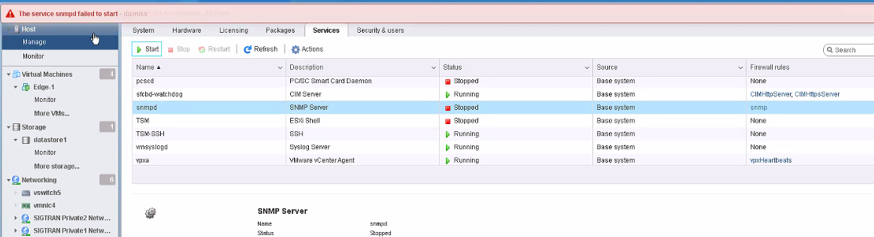
Starting snmpd service fails via gui and cli.
/etc/init.d/snmpd start
root: snmpd has not been enabled.
Symptoms:
Starting snmpd service fails via gui and cli.
/etc/init.d/snmpd start
root: snmpd has not been enabled.
Environment
VMware vSphere 6.x
VMware vSphere 6.7.x
VMware vSphere 7.x
Cause
snmpd target isn’t configured
[root@esx]esxcli system snmp get
Authentication:
Communities:
Enable: false
Engineid:
Hwsrc: indications
Largestorage: true
Loglevel: info
Notraps:
Port: 161
Privacy:
Remoteusers:
Syscontact:
Syslocation:
Targets:
Users:
V3targets:
[root@esx]esxcli system snmp test
must first configure at least one v1|v2c|v3 trap target
[root@esx]esxcli system snmp get
Authentication:
Communities:
Enable: false
Engineid:
Hwsrc: indications
Largestorage: true
Loglevel: info
Notraps:
Port: 161
Privacy:
Remoteusers:
Syscontact:
Syslocation:
Targets:
Users:
V3targets:
[root@esx]esxcli system snmp test
must first configure at least one v1|v2c|v3 trap target
Resolution
Follow the below steps in the ssh session of the host
Get the monitoring server IP address and use it as a target
esxcli system snmp set --targets=snmp_ip@port/communityname
example:
esxcli system snmp set –targets=x.x.x.x@161/public
Note: default port(UDP)and common community string has been used as a reference
enable snmp
esxcli system snmp set --enable true
validate if the target is configured
esxcli system snmp test
restart the snmpd service
/etc/init.d/snmpd restart
allow SNMP traffic in your ESXi host firewall, to allow SMNP requests from any device on the network:
esxcli network firewall ruleset set --ruleset-id snmp --allowed-all true
esxcli network firewall ruleset set --ruleset-id snmp --enabled true
esxcli network firewall refresh
you can now start the snmpd service from the GUI or CLI
Get the monitoring server IP address and use it as a target
esxcli system snmp set --targets=snmp_ip@port/communityname
example:
esxcli system snmp set –targets=x.x.x.x@161/public
Note: default port(UDP)and common community string has been used as a reference
enable snmp
esxcli system snmp set --enable true
validate if the target is configured
esxcli system snmp test
restart the snmpd service
/etc/init.d/snmpd restart
allow SNMP traffic in your ESXi host firewall, to allow SMNP requests from any device on the network:
esxcli network firewall ruleset set --ruleset-id snmp --allowed-all true
esxcli network firewall ruleset set --ruleset-id snmp --enabled true
esxcli network firewall refresh
you can now start the snmpd service from the GUI or CLI
Feedback
Yes
No
Powered by
