Unable to apply vSAN Storage Policy on NSX Controller/Edge VMs
Article ID: 326725
Updated On:
Products
VMware vSAN
Issue/Introduction
Symptoms:
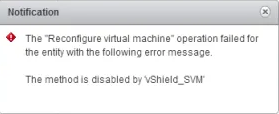
When attempting to apply a vSAN VM Storage Policy to NSX Controller/Edge VMs, you may receive a message that states:
"
"
The method is disabled by vShield_SVM"Environment
VMware vSAN 7.x
VMware vSAN 8.x
Cause
This error is due to the NSX VM being managed by the NSX Solution.
This is by default to ensure that users do not accidentally modify these service VMs.
This is by default to ensure that users do not accidentally modify these service VMs.
Resolution
In order to bring the NSX VMs up to compliance with the vSAN storage policy, access to the MOB is required to enable the ReconfigVM_Task method:
1. First, gather the MoRef ID for the VMs that are having the issue. This can be down by following Locating Virtual Machine MoRef IDs in vCenter Using MOB for NSX Edge VM Validation - or using PowerShell by running the below commands:
For an individual VM using vSphere client:
1. First, gather the MoRef ID for the VMs that are having the issue. This can be down by following Locating Virtual Machine MoRef IDs in vCenter Using MOB for NSX Edge VM Validation - or using PowerShell by running the below commands:
Connect-VIServer -Server 'VCSAName' -User 'useracctname' -Password 'useracctpw'Get-VM -Name 'VMnameimlookingfor' | Select Name,ID
Example output:
OUTPUT------Name Id---- --VMnameimlookingfor VirtualMachine-vm-41949For an individual VM using vSphere client:
-
- Open a web browser to the vCenter Server's Flex (Flash) or vSphere Client (HTML5)
- In the left hand side inventory, select the affected VM's object
- With the VM selected and highlighted, in the URL bar, review the string and look for "VirtualMachine:vm-xx"
Example:
https://ExamplevCenterFQDNorIP/ui/#?extensionId=vsphere.core.vm.summary&objectId=urn:vmomi:VirtualMachine:vm-141:########-####-####-####-3445fc35c5ba&navigator=vsphere.core.viTree.hostsAndClustersView
In this example VM's MOB ID is vm-141.
In this example VM's MOB ID is vm-141.
2. Once the MoRef IDs are found, you can go to the below URL logging in with [email protected] and password in order to start making the changes:
https://[vCenter FQDN/IP]/mob/?moid=AuthorizationManager&method=enableMethods3. There will be two fields that need to be modified in order to allow the VM to be changed:
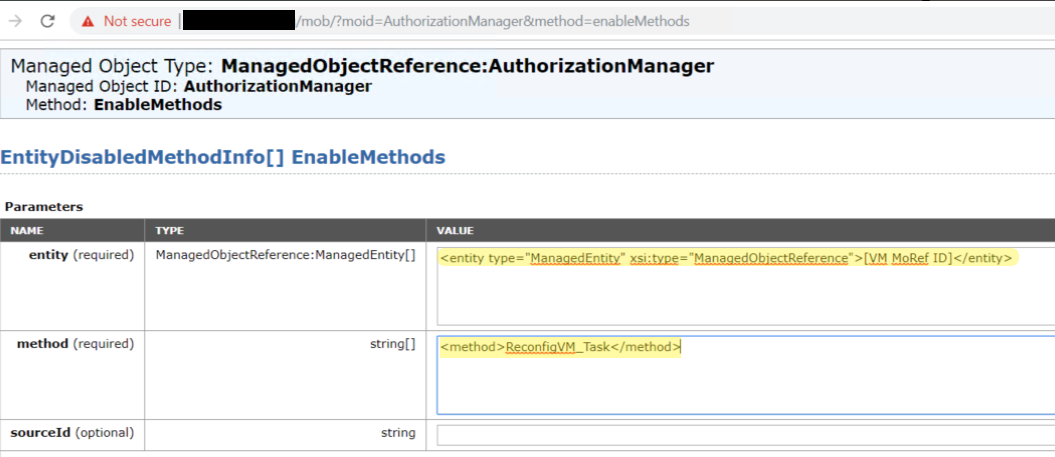
These should match exactly and the MoRef ID will need to be filled in for that VM. Leave sourceId blank and click "Invoke Method"
This should return output that lists methods that are still currently disabled.
These should match exactly and the MoRef ID will need to be filled in for that VM. Leave sourceId blank and click "Invoke Method"
This should return output that lists methods that are still currently disabled.
4. Go back to the vSphere Client and you should see that the VM "Edit Settings" is now available
You should now be able to re-apply the storage policy to the VM and it will be in compliance.
You should now be able to re-apply the storage policy to the VM and it will be in compliance.
Once all the VMs in concern have been modified, you will now need to disable the ability to edit those VMs:
1. Go to the following URL:
2. The following fields will need to match:
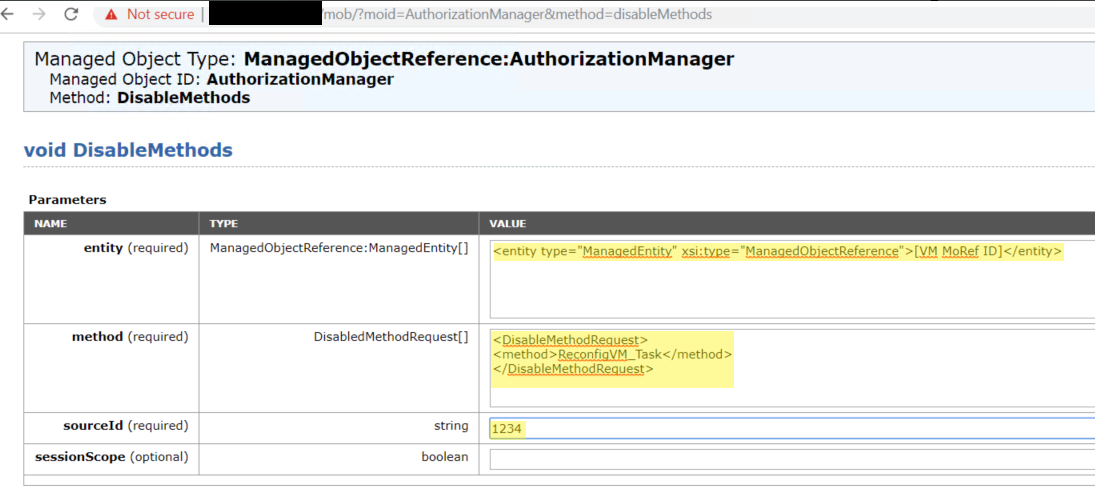
The sourceId can be a random 4 digit number as what is in the field doesn't matter but is required to have the filed populated to disable the edit ability of the VM.
3. Click "Invoke Method" and the returned output should state 'void'
You should then see that the VMs are no longer able to be edited
1. Go to the following URL:
https://[vCenter FQDN/IP]/mob/?moid=AuthorizationManager&method=disableMethods2. The following fields will need to match:
The sourceId can be a random 4 digit number as what is in the field doesn't matter but is required to have the filed populated to disable the edit ability of the VM.
3. Click "Invoke Method" and the returned output should state 'void'
You should then see that the VMs are no longer able to be edited
Feedback
Yes
No
Powered by
