Unable to load Credentials Management page
Article ID: 259251
Updated On:
Products
Issue/Introduction
You are unable to load the "credentials management" page. You received the error "Page Not Found"
The affected page is in the SMP Console under Settings>Monitoring and Alerting>Credential Settings>Credentials Management
The following error is displayed:
"The requested page could not be found. Either go back, correct the entered URL, or choose one of the specified links below"
However, if you try to load other pages under "Credential Settings", those work just fine as seen here:
Seems like that particular web link may be broken.
The customer said that this issue started happening after performing disaster recovery on the server.
Environment
ITMS 8.6 RU3
Cause
The following virtual directory is missing under "Default Web Site>Altiris" in IIS:
In case there is no "IIS 6 management compatibility" available under the IIS Roles and Features as seen here:
After a clean or repair of the ITMS installation, there will be no CredentialManager application available under "Default Web Site":
Resolution
1. Make sure all files are available in "<installdrive>:\Program Files\Altiris\CredentialManager" folder:
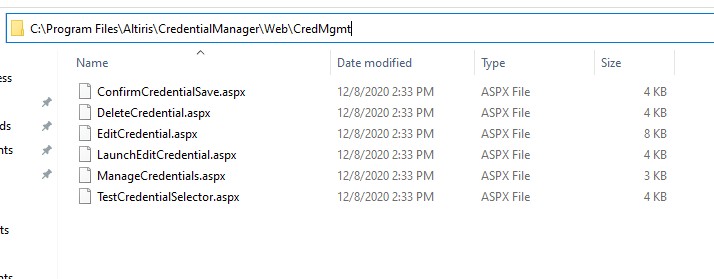
Then, you can work around this problem:
1. Open "Internet Information Services (IIS) Manager" as Administrator
2. Right-click on root "Altiris" application > "Add Application":
3. Specify the same "Alias" and "Physical Path" and click "OK":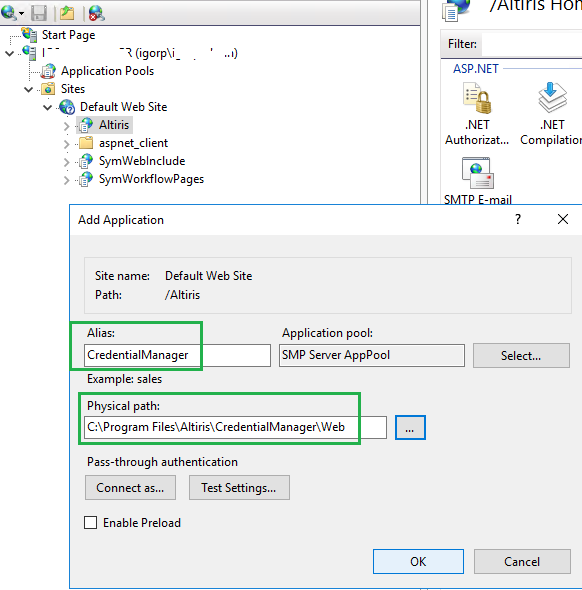
4. Restart:
"World Wide Web Publishing Service",
"Altiris Service",
"Altiris Object Host Service",
"Altiris Inventory Rule Management Service" services
and try to open that page in SMP Console.
Additional Information
Feedback
