Download the latest version of Advanced Authentication (AA) client side packages
Article ID: 188284
Updated On:
Products
Issue/Introduction
How to download the latest version of Advanced Authentication (AA) client side packages from Broadcom Support Portal?
Environment
Release : 9.1 SP5 CP2
Component : Advanced Authentication (Arcot WebFort, RiskFort)
Resolution
Follow these steps to download the latest version of Advanced Authentication client side packages from Broadcom support portal:
1. Login to Broadcom Portal using this link
2. Click on 'My Downloads'
3. Search 'CA ADVANCED AUTHENTICATION' product on the 'My Downloads' page and click on 'Show results'
4. Click on 'CA Advanced Authentication - Strong Authentication (AuthMinder / WebFort)'
5. Click on 'CA AuthMinder Multi-Platform MULTI PLATFORM' in 'Solutions' tab and select 9.1 release.
5. Click on link 'Advanced Authentication 9.1.5.2'.
6. Select the package intended to your environment and choose the download options.
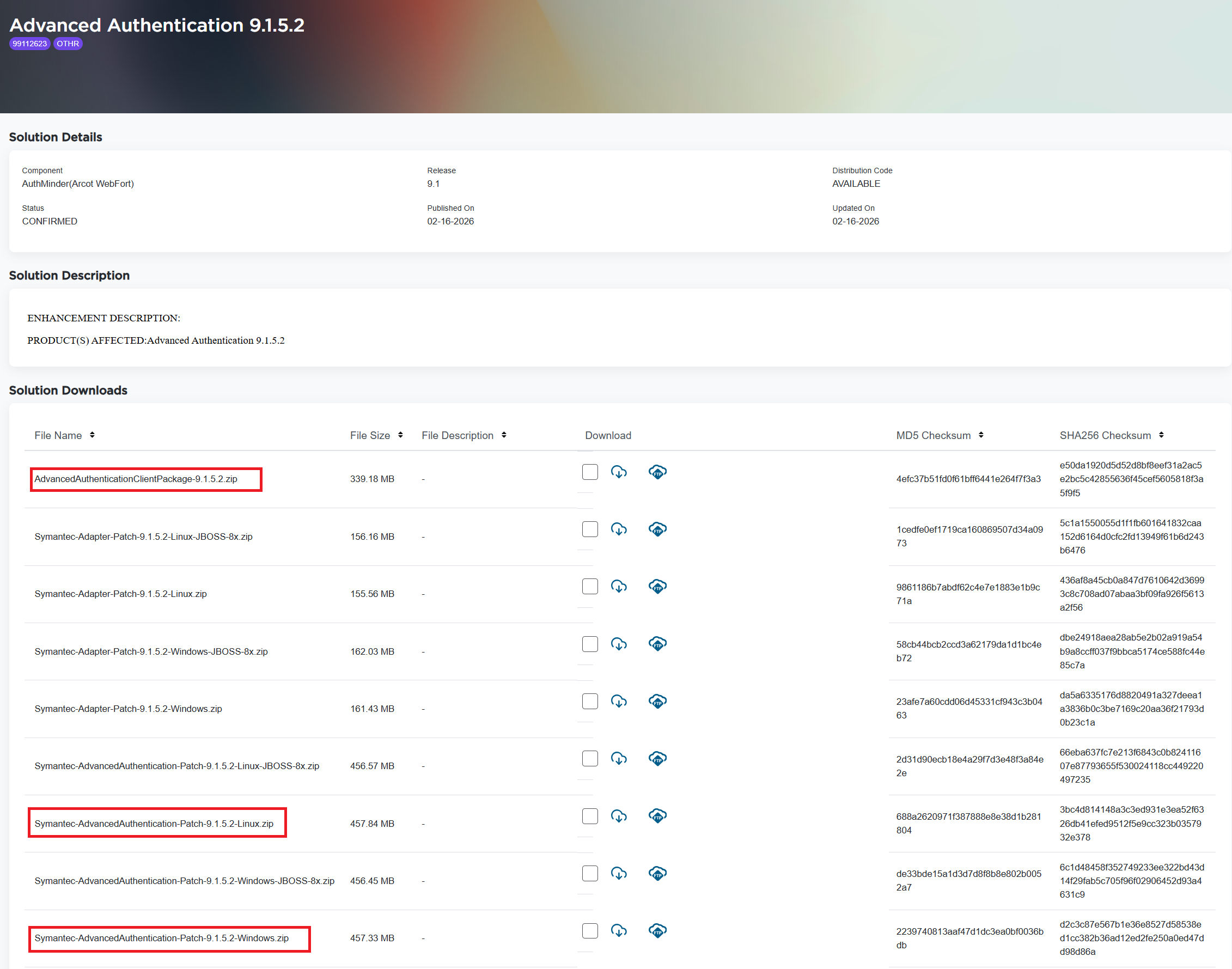
Package Highlights
- AdvancedAuthenticationClientPackage-9.1.5.2.zip - SDKs for iOS and Android
- Symantec-AdvancedAuthentication-Patch-9.1.5.2-Linux.zip - upgrade patch for Linux OS
- Symantec-AdvancedAuthentication-Patch-9.1.5.2-Windows.zip - upgrade patch for Windows OS
- Symantec-Adapter-Patch-9.1.5.2-Linux.zip & Symantec-Adapter-Patch-9.1.5.2-Windows.zip - Adapter upgrade patch for Linux and Windows OS respectively.
- Rest JBOSS-8x packages are specific for JBOSS deployed environment.
Additional Information
Please refer Release notes link for more details.
Feedback
